Every filmmaker has been there. You finish a shoot, drop the footage into your timeline, and the image looks wrong. Stretched faces. Black bars where you didn’t expect them. A 9:16 vertical clip in the middle of your 2.39:1 widescreen sequence. You start googling "what resolution is 2.39:1 in 4K" and end up in a rabbit hole of pixel math.
Aspect ratios are one of those things that seem simple until they’re not. And once you understand them properly, they become one of the most powerful creative tools you have.
The Ratio Is the First Creative Decision
Before you pick a lens, before you light a scene, the aspect ratio defines how your audience sees the world. A 2.39:1 scope frame feels epic and cinematic. It’s Lawrence of Arabia, it’s Blade Runner 2049, it’s every wide landscape that makes you hold your breath. A 4:3 frame feels intimate, almost claustrophobic. It’s why The Lighthouse shot in 1.19:1 and why Mommy used 1:1. The frame shape tells the story before a single word of dialogue.
Most people pick 16:9 because it’s the default. That’s fine for YouTube and corporate work. But if you’re making something that should feel different, the aspect ratio is your cheapest and most effective tool. No extra gear needed. Just a decision.
The Ratios You Actually Need to Know
There are dozens of aspect ratios, but in practice you’ll use maybe five or six. Here’s what matters.
2.39:1 (Anamorphic Scope) is the widest standard format. It’s what you see in most big-budget films. At 4K, that’s 3840×2608 if you crop, or 4096×1716 in true DCI. This is the ratio that makes landscapes breathe and chase scenes feel fast. The downside: you lose a lot of vertical space, so close-ups need careful framing.
1.85:1 (Flat Widescreen) is the other standard cinema format. Slightly wider than 16:9, just enough to feel cinematic without being extreme. A lot of dialogue-heavy films use this because it gives you room for two people in frame without the ultra-wide emptiness of scope.
16:9 (1.78:1) is the standard for everything digital. YouTube, streaming, TV. If you’re delivering for the web and don’t have a specific creative reason to use something else, this is your safe choice.
4:3 (1.33:1) is the old TV standard, but it’s having a renaissance. Music videos, A24 films, anything that wants to feel personal or retro. It forces the viewer’s eye to focus on what’s in the center of frame.
9:16 (Vertical) is what your phone shoots natively. TikTok, Instagram Reels, YouTube Shorts. Love it or hate it, vertical content is where the eyeballs are. If you’re not thinking about vertical deliverables, you’re leaving reach on the table.
The Letterbox Problem
Here’s where it gets practical. You shot in 16:9 but you want the cinematic 2.39:1 look. You have two options. You can crop in post, which means losing pixels and resolution. Or you can add letterbox bars, which preserves your full image but adds black bars on top and bottom.
The crop approach is fine if you planned for it. Shoot 4K, crop to 2.39:1, deliver at 1080p. You still have plenty of resolution. But if you shot 1080p and try to crop to scope, your image is going to look soft.
The letterbox approach is what most people use in post. You create a mask or overlay and place it on top of your footage. Simple in theory, annoying in practice. You need to calculate the exact bar height for your resolution and target ratio, create the mask, make sure it’s pixel-perfect, and export it with the right settings.
I used to do this manually every time. Photoshop, calculate the bar height, export a PNG, import it into Premiere, stretch to fit. It worked, but it was tedious. And if the client wanted a different ratio, I’d start over.
Making It Less Painful
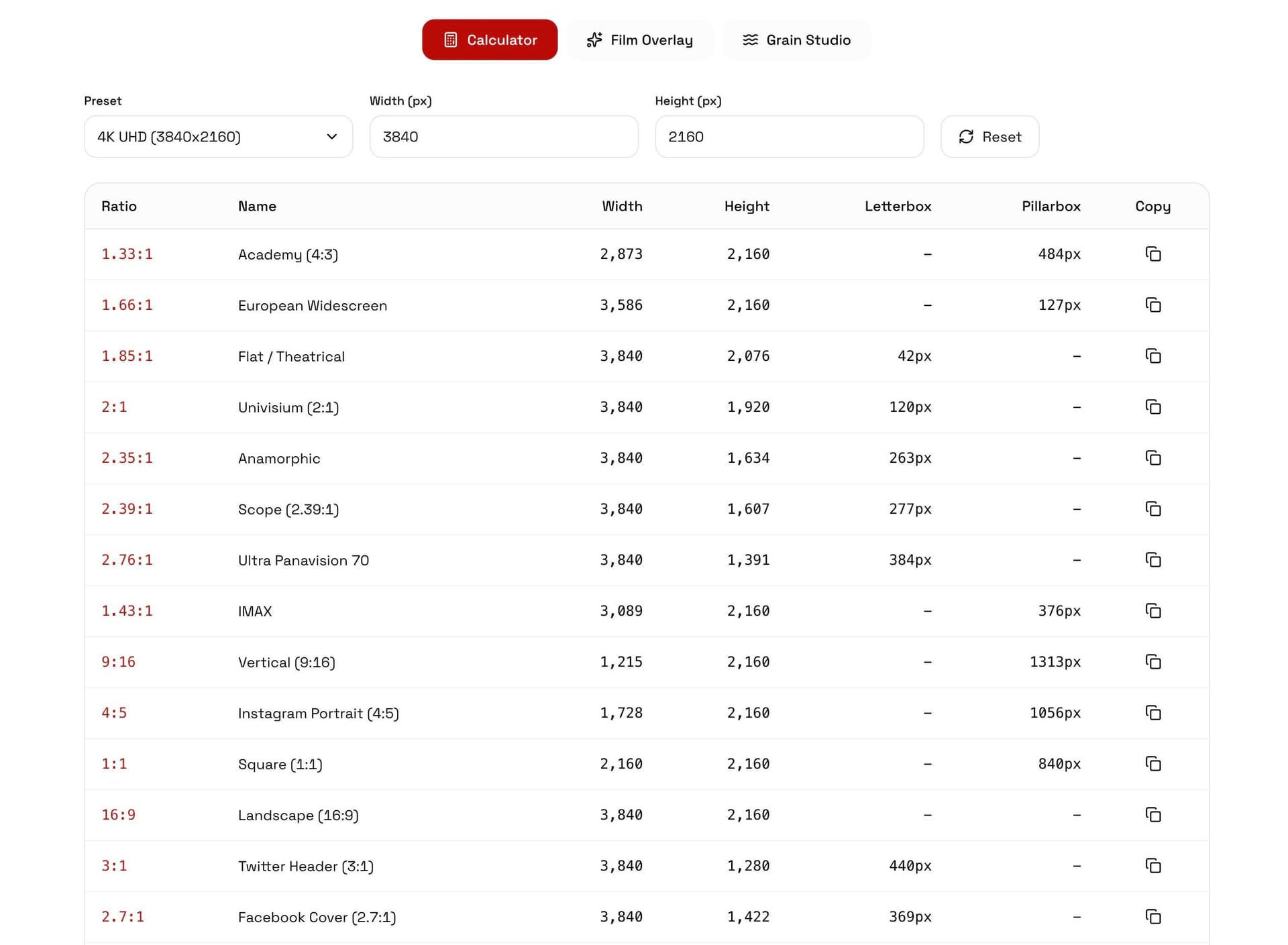
This is why I built the Aspect Ratio Calculator on my site. It started as a quick tool called Letterbox. Pick a ratio, pick a resolution, see the exact pixel dimensions. But then I kept adding things because the workflow had more friction points than just math.
The calculator shows you every common ratio with the actual pixel dimensions at any resolution. No more mental math trying to figure out what 2.39:1 is at 3840 pixels wide.
The Film Overlay Studio lets you preview how different ratios look on your actual footage. Drop in an image or video, switch between ratios, and see exactly how the crop or letterbox will look before you commit. You can add film grain, vignette, and gate weave effects if you want that analog texture.
And you can export letterbox overlays as MOV files with alpha transparency. Drop them straight into Premiere Pro, DaVinci Resolve, or Final Cut Pro. No Photoshop, no manual calculations, no pixel-counting.
Social Media Ratios Are a Moving Target
One thing that catches people off guard is how different every platform’s requirements are. Instagram feed posts look best at 4:5. Stories and Reels are 9:16. YouTube is 16:9. LinkedIn prefers 1:1 or 16:9. TikTok is 9:16 but their safe zones eat into your frame.
If you’re delivering a project with social cutdowns, you need to think about this before the edit, not after. Framing a wide shot at 2.39:1 that also needs to work as a 9:16 vertical means your subject needs to be center-frame. Or you need to plan for a separate vertical edit with different framing.
The best approach I’ve found is to shoot wider than you need and crop for each platform in post. Shoot 16:9 or even open gate, then create deliverables for each platform. It’s more work in post but the result is better than stretching or auto-cropping.
The Cheat Sheet
Here are the ratios I use most and when I reach for each one.
For cinematic work that needs to feel big: 2.39:1. For narrative films that are dialogue-heavy: 1.85:1. For YouTube and standard web delivery: 16:9. For music videos or anything that should feel raw and intimate: 4:3. For social content: 9:16 vertical or 1:1 square.
Don’t overthink it. Pick the ratio that serves the story, not the one that looks the most "cinematic." Sometimes 16:9 is the right call. Sometimes 4:3 is what makes the piece work. The best ratio is the one you chose on purpose.
If you want to play around with different ratios on your own footage, try the Aspect Ratio Calculator. It’s free, runs in your browser, and might save you from another round of pixel math.