I lost a full day of work because I couldn't find a color grading project file.
It was somewhere on one of my drives. Maybe in the "Exports" folder. Or was it "Final"? Or "Final_V2_REAL"? I had six folders with the word "final" in them. The client was waiting. I was scrolling through folders like an archaeologist digging through rubble.
That was the moment I decided to fix my file structure. Not tomorrow. That day.
The Real Cost of a Messy Folder Structure
Most creatives don't think about folder structure until something goes wrong. A missed deadline because you couldn't find the right export. A corrupted project file because your originals lived in the same folder as your renders. A backup that didn't catch everything because your files were scattered across three drives.
The math is simple. If you spend 10 minutes a day looking for files, that's over 60 hours a year. That's an entire work week and a half, gone. Multiply that across a team and it gets ugly fast.
What a Good Structure Actually Looks Like
After years of trial and error, working on commercials, documentaries, brand films, and photo shoots, I've landed on a system that works. It's not complicated. It's six core sections.
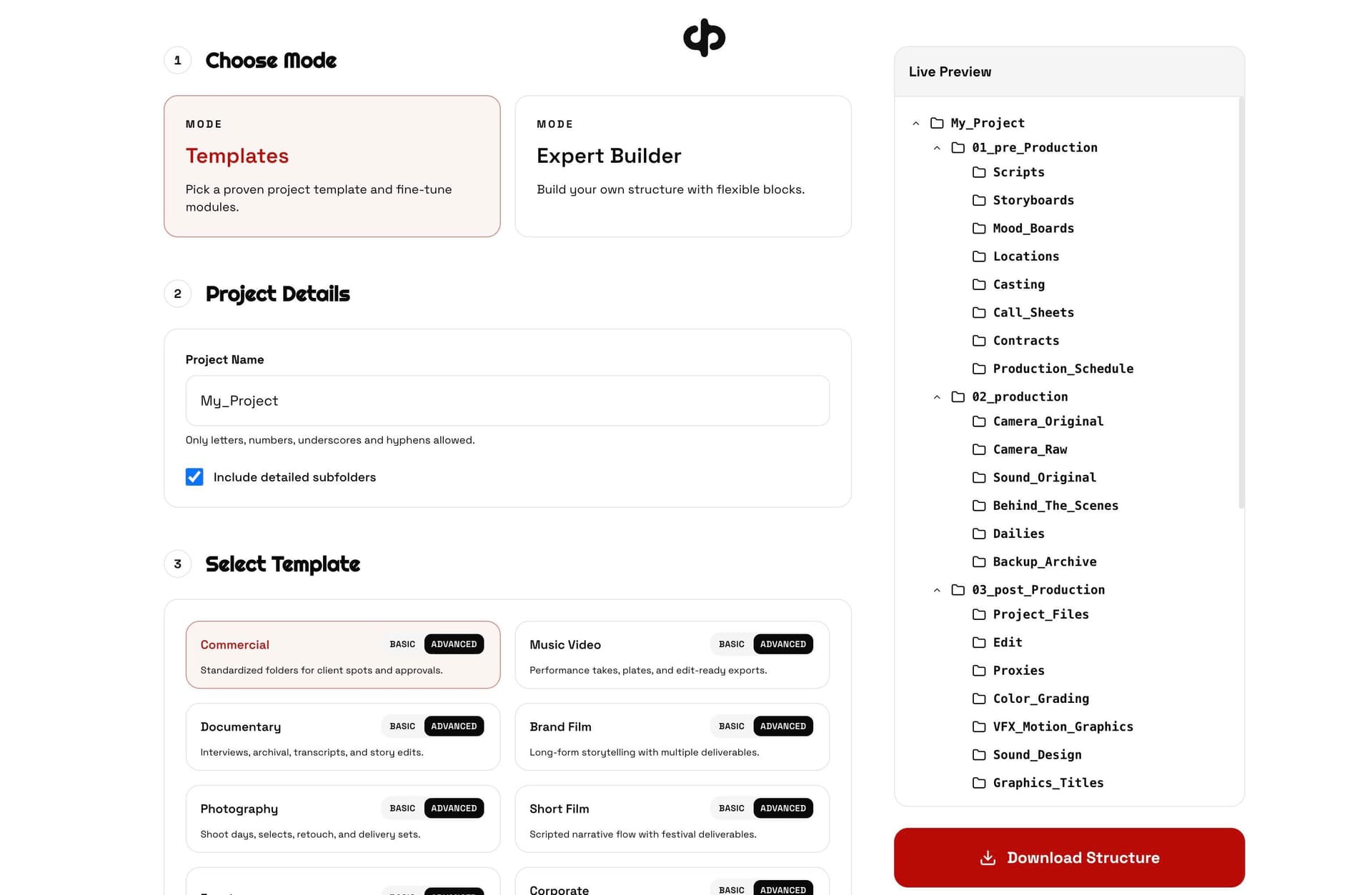
Pre-Production is everything before you press record. Scripts, shot lists, storyboards, mood boards, call sheets, contracts. All of it lives here, organized and easy to find when someone asks "did we sign that release?"
Production is your raw material. Camera originals, sound recordings, behind-the-scenes footage, on-set stills. The key rule: never edit files in this folder. It's sacred ground. Your originals stay untouched.
Post-Production is where the work happens. Project files, edits, color grading, VFX, sound design, exports. This is usually the messiest folder for most people, which is why it needs the most structure. I split it into clear subfolders: Edit, Color, Sound, VFX, Graphics, Renders, and Client Reviews.
Admin holds your invoices, contracts, budgets, and legal documents. Boring but essential. When tax season comes around, you'll thank yourself.
Social Media is for platform-specific deliverables. Instagram, TikTok, YouTube, LinkedIn. Each gets its own folder because dimensions, codecs, and naming conventions are different for each platform.
Archive is your long-term storage plan. Final masters, project backups, selects, and outtakes. This is what goes to cold storage when the project is done.
Tips That Actually Save Time
Use dates in your naming. Not "Monday's shoot" but "260403" (YYMMDD). Files sort chronologically. You'll find things faster. Your future self will appreciate it.
Number your folders. 01_Pre-Production, 02_Production, 03_Post-Production. They stay in order regardless of the operating system or sorting method.
Separate originals from working files. This is the single most important rule. Your camera files and audio recordings should never live in the same folder as your project files. One accidental delete and you lose everything.
Create proxies. If you're editing 4K or higher, make lightweight proxy files for editing. Keep the originals safe in Production, work with proxies in Post. Your editing software will thank you.
Use the 3-2-1 backup rule. Three copies of your data, on two different types of media, with one copy offsite. Sounds excessive until a drive fails.
Version your files. ProjectName_Edit_V01, ProjectName_Edit_V02. Never overwrite. Never use "final" in a filename. There's always another version after "final."
Different Projects, Different Needs
A commercial shoot doesn't need the same structure as a wedding film. A documentary has archival material and transcripts that a corporate video doesn't. A photography project has RAW files and retouching folders instead of timelines and renders.
The structure should adapt to the work, not the other way around.
For commercials and brand films, you need solid client review folders with clear versioning. Clients change their minds. You need to find V3 from two weeks ago in seconds.
For documentaries, transcripts and research folders are essential. You might have hundreds of hours of interviews. Without a system, finding that one quote is impossible.
For photography, the key is separating RAW from processed files and having a clear selects workflow. Shoot day folders keep things organized when you're dealing with thousands of images.
For events and weddings, timeline-based organization works best. Ceremony, reception, speeches, first dance. Your editor will move faster when the footage is organized by moment, not by card number.
I Built a Tool for This
I got tired of creating these structures manually for every new project. So I built a free tool that generates the entire folder structure for you.
You pick your project type, choose which sections you need, customize the details, and download a ready-to-use ZIP file. Thirteen project types, from commercials to podcasts. Basic templates for quick setups, advanced templates for full productions.
You can try it at paulkothe.de/tools/project-structure. No signup, no email, just pick your project type and download.
The Best Time to Organize Is Before You Start
Setting up your folder structure takes five minutes at the start of a project. Finding a lost file in the middle of a deadline takes hours. The choice is obvious.
Pick a structure. Stick with it. Every project, every time. Your future self, your editors, your clients, and your accountant will all thank you.