Offline Files started with one simple idea: plug in a drive once, index it locally, then find files later even when the drive is not connected.
That is still the core. No cloud. No account. No subscription. Offline Files stores metadata on your Mac, not your files.
Since version 1.21, the app has become faster, more visual, better for media work, and more useful across multiple Macs.
Shared Catalogs
The biggest change is Shared Catalogs, now in beta.
Offline Files can store drive catalogs in a shared folder, for example on a NAS, SMB share, server, WebDAV folder, or another location that multiple Macs can access.
That means one Mac can scan a drive, and another Mac can search that catalog without scanning everything again. It is still local-first. There is no Offline Files cloud. The shared folder is where the catalog lives.
Version 1.26 also moved the app to per-drive catalog storage. Instead of one large database for all drives, each drive gets its own catalog. This makes search faster on larger setups and makes it easier to move individual catalogs between local and shared storage.
Offline Thumbnails
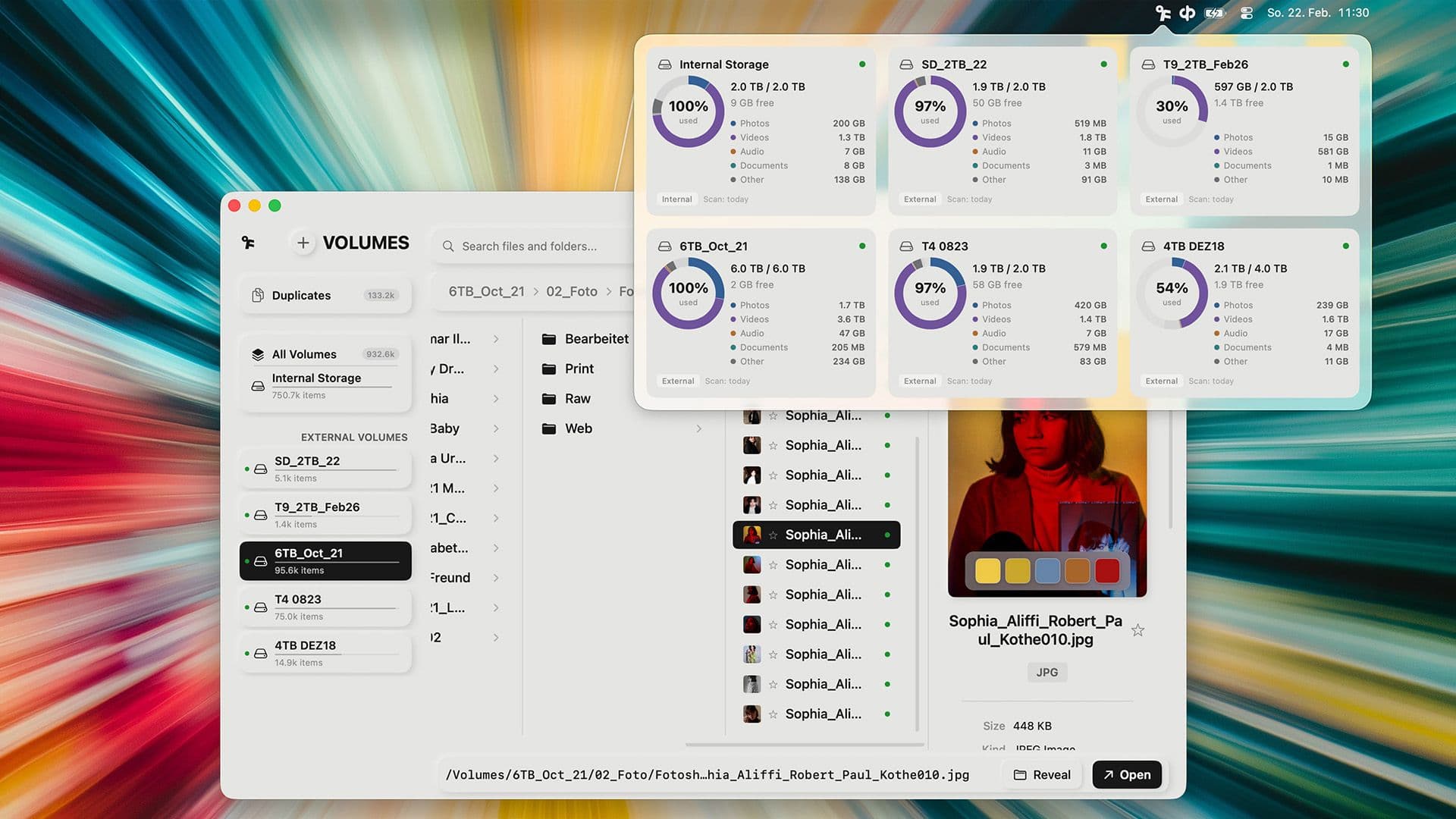
Offline Thumbnails let you see previews even when the original drive is disconnected.
You can enable thumbnails per volume, choose cache limits, and let Offline Files generate them in the background. In 1.26.2, thumbnail generation became much faster for many photo and video formats. JPEG, RAW and similar files can use embedded previews, and MP4/MOV thumbnails use hardware-accelerated frame extraction where possible.
Shared thumbnails are part of this too. If one Mac generates thumbnails for a shared catalog, another Mac can use them without rebuilding the same cache.
Spotlight and Storage Analytics
Offline Files can now publish indexed files to macOS Spotlight. Search with Cmd+Space and results can show the drive name and file path, even if the drive itself is not connected.
Storage Analytics adds a visual overview across your indexed drives: media categories, volume comparisons, largest file types, and large folders. The volume overview was also redesigned with clearer category cards for Photos, Videos, Audio, Documents, and Other.
Better Search
Search is more precise now.
Name-only search limits matches to file names, so a folder name in the path no longer pulls in everything below it. You can exclude terms with a minus sign, like vacation -draft. Results with an active query sort by relevance by default.
These are small changes, but they make search match more specific intent.
Blackmagic RAW Support
Offline Files now supports Blackmagic RAW.
You can browse .braw clips, generate thumbnails, preview stills, and play clips in Quick Look using the official Blackmagic RAW SDK. Playback supports scrubbing, fullscreen, mute, play/pause, and synchronized PCM audio.
You can also drop markers and export marked frames as PNG, JPEG, or TIFF images.
Audio Preview
Version 1.26.2 adds better audio handling too.
Audio files such as MP3, M4A and FLAC can show embedded album artwork as thumbnails. There is also a new audio preview player with cover artwork, a spectrum visualizer, scrubbable progress, and centered playback controls.
Quick Buttons and Folder Info
Quick Buttons let you pin up to five frequently used files or folders to the sidebar. Right-click an item, add it as a Quick Button, then customize the icon.
Folders also show more useful context now: child count, last modified date, and recursive size. That helps when project folders have similar names but very different contents.
Duplicate Cleanup
Duplicate detection has a clearer layout with a master list, detail view, preview, copy counts, newest/oldest labels, and reclaimable-space totals.
You can also move duplicate copies to the Trash directly from Offline Files, with confirmation before anything is moved.
More Languages, More Polish
Offline Files now supports 14 languages: English, German, Spanish, French, Italian, Japanese, Chinese, Portuguese, Korean, Turkish, Indonesian, Dutch, Polish, and Hindi.
There were also many bug fixes and reliability improvements across scanning, NAS handling, bookmarks, Smart Analyze, Quick Look, Spotlight, shared catalogs, and the sidebar.
Short Version
If you last used Offline Files around 1.20 or 1.21, the app now has:
- Shared Catalogs for multi-Mac workflows
- faster per-drive catalog storage
- offline thumbnails and shared thumbnails
- macOS Spotlight integration
- storage analytics
- name-only search, exclusions, and relevance sorting
- Blackmagic RAW preview and playback
- marker-based BRAW frame export
- audio thumbnails and audio preview
- Quick Buttons in the sidebar
- richer folder metadata
- redesigned duplicate cleanup
- 14-language localization
Offline Files is still for the same problem: you need a file, you know it exists, and you do not want to plug in five drives to find it.
Now it is faster, more visual, and better suited to multi-drive, multi-Mac workflows.