The last time I wrote about Offline Files, version 1.26 had just introduced shared catalogs, offline thumbnails, Spotlight integration and a much faster per-drive catalog system.
Four releases later, the core idea is still the same: index a drive once and search it later, even when it is sitting on a shelf. But the app around that idea has become much easier to enter, faster to use throughout the day and calmer when something goes wrong.
Versions 1.28 through 1.31 are less about one giant headline feature and more about removing friction from the entire archive workflow.
Cloud Drives Join the Catalog
Version 1.28 added opt-in support for Dropbox, iCloud Drive, Google Drive and OneDrive. They appear as external volumes and are only indexed after you grant access.
This does not turn Offline Files into another cloud service. The app still builds a private local index. It simply understands the folders managed by the cloud providers you already use, including modern macOS File Provider locations.
The new Add Volume sheet brings connected drives, detected cloud storage and previously added offline drives into one place. If macOS loses access to a known drive, a repair option appears there only when it is needed. Cloud volumes also avoid pretending that macOS knows their true capacity when a provider cannot report it; in that case, Offline Files shows the amount of indexed data instead.
A Calmer Way to Manage Drives
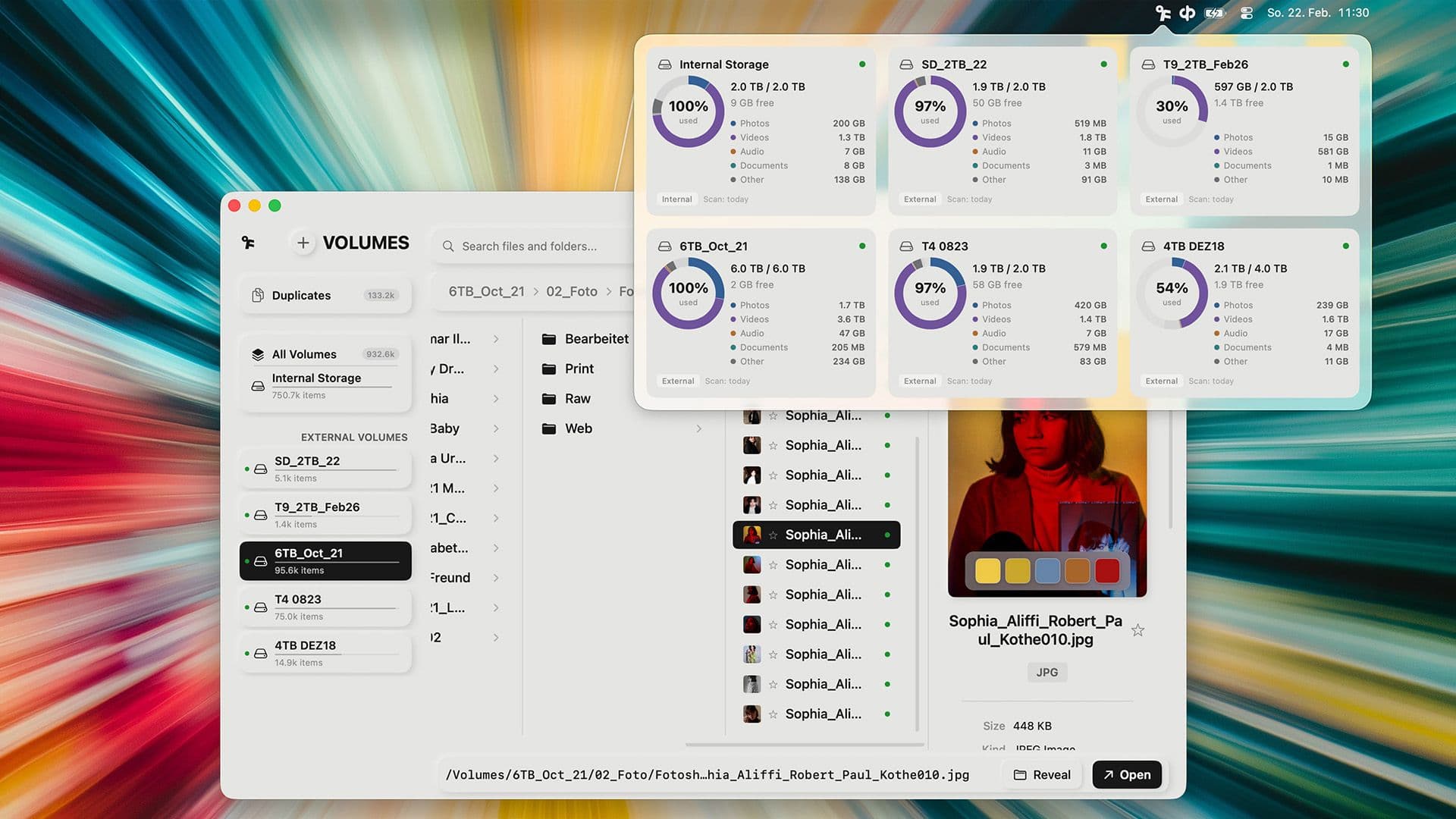
The Volumes overview was rebuilt around the information I actually want when I look at an archive: free local space, online and offline drives, cloud volumes and a clear file-type breakdown.
Drive cards now use the same visual language in the main window and menu bar. File-type colors are easier to distinguish, notes stay compact until you edit them, and the shared selection bar behaves consistently across the File Browser, All Files, Search, Favorites, Groups and Smart Albums.
Version 1.29 continued that cleanup. The Groups and External Volumes sections can be collapsed, favorite files remain visible as favorites inside search results, and long lists behave more reliably when filters or sorting change quickly.
A Better First Run
Offline Files has grown well beyond the tiny utility I first shipped, so version 1.29 added a Product Tour after setup. It introduces the main window without forcing you through a long manual, and you can replay it from Settings whenever you need a refresher.
The same release also made access bookmarks more reliable for ExFAT drives and SMB shared-catalog folders. That is not a flashy feature, but it matters: adding a drive should feel like adding a drive, not like debugging macOS permissions.
Search Without Opening the Main Window
Version 1.30 brought search directly to the menu bar. I can look across every indexed drive from anywhere on the Mac, then open the result in the full app when I need more context.
Search also gained inline autocomplete. As you type, Offline Files suggests likely matches from the catalog, which makes repeated project names, locations and client folders much quicker to find.
New desktop and Notification Center widgets keep drive status visible without opening the app. They are small additions, but together with menu bar search they make Offline Files feel less like a destination and more like part of macOS.
Metadata That Explains What It Is Doing
The background pipeline received a substantial overhaul in 1.30. Metadata indexing, thumbnail generation and Smart Analyze now communicate their status more clearly and save more useful facts for lists and search.
The list view is quieter, online and offline media behave more consistently, and the Volumes overview can sort drives by name or free space while remembering the choice between launches. General Settings were reorganized too, keeping everyday controls visible and pushing developer tools out of the way.
Problems No Longer Take Over the Screen
The biggest quality-of-life change in 1.31 is how Offline Files handles problems. Technical errors no longer interrupt the workflow with blocking dialogs. Catalog and background-processing issues appear as compact notifications with details you can expand when you are ready.
Recovery now matches the actual problem. A damaged catalog layer can be repaired or rescanned. Metadata, Smart Analyze and thumbnail jobs can be retried. Repeated failures are grouped into a useful summary instead of producing the same popup again and again.
Thumbnail generation also became more resilient. It tries fallback methods, remembers affected paths and avoids hammering the same file with endless retries. A successful attempt clears the issue automatically.
More Useful Volume Details, Less Sidebar
The latest 1.31 build adds a proper Get Info view for volumes, including capacity, free space, path, UUID, last scan and file system. Redesigned volume cards expose more of that information without becoming visually heavy.
The sidebar can now collapse into a compact icon rail with badges and expandable group flyouts. On a smaller MacBook display, that extra room makes a noticeable difference when browsing thumbnails or long file names.
The Short Version
If you last opened Offline Files around version 1.26, the app now includes:
- opt-in catalogs for Dropbox, iCloud Drive, Google Drive and OneDrive
- a redesigned Add Volume flow with access repair
- a replayable Product Tour
- menu bar search with inline autocomplete
- drive-status widgets for the desktop and Notification Center
- clearer metadata, thumbnail and Smart Analyze progress
- non-blocking issue reports with targeted recovery actions
- richer volume information and a collapsible sidebar
The app is still built for the same moment: you remember the file, but not which drive holds it. These four updates make getting from that thought to the right drive much faster.